Showing posts with label Java. Show all posts

Wednesday, February 14, 2018

How to make @requestparam optional in spring

Question:

Make spring endpoint with optional request parameters

Solution:

To make the request parameter optional on the spring controller, user JAVA 8 feature Option type or set required attribute to false.

public void count(@RequestParam(name="name") Optional name){
if (name.isPresent()) { 
 String name= name.get()
....
}
}


Friday, January 19, 2018

Error: Could not find or load main class org.gradle.wrapper.GradleWrapperMain

Issue:

Error: Could not find or load main class org.gradle.wrapper.GradleWrapperMain. Bitbucket pipeline or Jenkins console output, the build is failed – “Could not find org.gradle.wrapper.GradleWrapperMain”

Solution:

This error will be thrown when gradlew build unable to find the gradle folder which contains the gradle-wrapper.jar file, if the generated gradle-wrapper.jar is not check-in/commit to bitbucket please check-in or add the file.

    gradle folder structure:
|---gradle
    |---wrapper
        |---gradle-wrapper.jar
        |---gradle-wrapper.properties
|---gradlew
|---gradlew.bat 


Wednesday, January 13, 2016

Remove or Filter Stopping/Stemming words using java

For the better indexing or searching the data in the big text chunk we need to filter the unwanted words from the data to get the better performance on the search by indexing only the logical words.

What is Stopping Words?

Stopping words are the words which will be used to make the sentence along with consonants/verbs i.e. where is my car? in this "where/is/my" are the stopping words which are not required for the search.

What is Stemming Words?

Stemmer are the words which will make the action word along with stopping words. i.e Stopping Word + "ing/tion/ational/ization/ation....etc" : going/standing

I was looking of the library to achieve the filtering of the stopping/stemming words, Not found much on googling, decided to go through the stopping/stemming words blogs/white papers and algorithms, started writing small util library to do the filtering by using java and its available on maven repository and full source on github.

Exude Library

This is simple library for removing/filtering the stopping,stemming words from the text data, this library is in very basic level of development need to work on for later changes.

This is the part of maven repository now,Directly add in pom following.

    <dependency>
        <groupId>com.uttesh</groupId>
        <artifactId>exude</artifactId>
        <version>0.0.2</version>
    </dependency>
Download latest version of exude download

Features:
1.Filter stopping words from given text/file/link
2.Filter stemming words from given text/file/link
3.Get swear words from given text/file/link

How Exude library works:
Step 1: Filter the duplicate words from the input data/file.
Step 2: Filter the stopping words from step1 filtered data.

Step 3: Filter the stemmer/swear words from step2 filtered data using the Porter algorithm which is used for suffix stripping.
exude process sequence flow:
How to use exude Library
Environment and dependent jar file
1.Minimum JDK 1.6 or higher
2.Apache Tika jar (which is used to parse the files for the data extraction)


Sample code
Sample Text Data
 String inputData = "Kannada is a Southern Dravidian language, and according to Dravidian scholar Sanford Steever, its history can be conventionally divided into three periods; Old Kannada (halegannada) from 450–1200 A.D., Middle Kannada (Nadugannada) from 1200–1700 A.D., and Modern Kannada from 1700 to the present.[20] Kannada is influenced to an appreciable extent by Sanskrit. Influences of other languages such as Prakrit and Pali can also be found in Kannada language.";
 String output = ExudeData.getInstance().filterStoppings(inputData);
output

extent southern influenced divided according halegannada kannada language three 450 found modern influences periods pali steever a middle d languages old nadugannada dravidian sanford history scholar appreciable 1700 1200 conventionally sanskrit prakrit present 20 
Sample File Data
String inputData = "any file path";
String output = ExudeData.getInstance().filterStoppings(inputData);
System.out.println("output : "+output);
Sample link Data
String inputData = "https://en.wikipedia.org/wiki/Rama";
String output = ExudeData.getInstance().filterStoppings(inputData);
System.out.println("output : "+output);
Get swear words from data/file/link
String inputData = "enter text with bad words";
String output = ExudeData.getInstance().getSwearWords(inputData);

Library source code on github

Tuesday, April 14, 2015

JMETER load testing by code/ JMETER API implementation sample by java code

This tutorial attempts to explain the basic design, functionality and usage of the Jmeter, Jmeter is excellent tool used to perform load testing on the application, By using the jmeter GUI we can create the test samples for the request
according to our requirement and execute the samples with load of number of users.
As jmeter tool is fully developed by using JAVA, We can write the java code to do the same without using the GUI of the jmeter, Its not advisable to implement the java code for the load testing, its just a proof of concept to write the samples by java code using the jmeter libraries.
Jmeter as very good documentation/APIs, After going through the jmeter source code and other reference resources, wrote the following sample code.

Pre-prerequisites:


Prior to understand following code we must have basic knowledge of the how jmeter works.
Initially we need load the jmeter properties which will be used by jmeter classes/libraries in later stage of code
//JMeter Engine
StandardJMeterEngine jmeter = new StandardJMeterEngine();
//JMeter initialization (properties, log levels, locale, etc)
JMeterUtils.setJMeterHome(jmeterHome.getPath());
JMeterUtils.loadJMeterProperties(jmeterProperties.getPath());
JMeterUtils.initLogging();// you can comment this line out to see extra log messages of i.e. DEBUG level
JMeterUtils.initLocale();

1. Create "Test Plan" Object and JOrphan HashTree

//JMeter Test Plan, basically JOrphan HashTree
HashTree testPlanTree = new HashTree();
// Test Plan
TestPlan testPlan = new TestPlan("Create JMeter Script From Java Code");
testPlan.setProperty(TestElement.TEST_CLASS, TestPlan.class.getName());
testPlan.setProperty(TestElement.GUI_CLASS, TestPlanGui.class.getName());
testPlan.setUserDefinedVariables((Arguments) new ArgumentsPanel().createTestElement());

2. Samplers : Add "Http Sample" Object

Samplers tell JMeter to send requests to a server and wait for a response. They are processed in the order they appear in the tree. Controllers can be used to modify the number of repetitions of a sampler
// First HTTP Sampler - open uttesh.com
HTTPSamplerProxy examplecomSampler = new HTTPSamplerProxy();
examplecomSampler.setDomain("uttesh.com");
examplecomSampler.setPort(80);
examplecomSampler.setPath("/");
examplecomSampler.setMethod("GET");
examplecomSampler.setName("Open uttesh.com");
examplecomSampler.setProperty(TestElement.TEST_CLASS, HTTPSamplerProxy.class.getName());
examplecomSampler.setProperty(TestElement.GUI_CLASS, HttpTestSampleGui.class.getName());

3.Loop Controller

Loop Controller will execute the samples number times the loop iteration is declared.
// Loop Controller
LoopController loopController = new LoopController();
loopController.setLoops(1);
loopController.setFirst(true);
loopController.setProperty(TestElement.TEST_CLASS, LoopController.class.getName());
loopController.setProperty(TestElement.GUI_CLASS, LoopControlPanel.class.getName());
loopController.initialize();

4.Thread Group

Thread group elements are the beginning points of any test plan. All controllers and samplers must be under a thread group. Other elements, e.g. Listeners, may be placed directly under the test plan, in which case they will apply to all the thread groups. As the name implies, the thread group element controls the number of threads JMeter will use to execute your test.

// Thread Group
ThreadGroup threadGroup = new ThreadGroup();
threadGroup.setName("Sample Thread Group");
threadGroup.setNumThreads(1);
threadGroup.setRampUp(1);
threadGroup.setSamplerController(loopController);
threadGroup.setProperty(TestElement.TEST_CLASS, ThreadGroup.class.getName());
threadGroup.setProperty(TestElement.GUI_CLASS, ThreadGroupGui.class.getName());

5. Add sampler,controller..etc to test plan

// Construct Test Plan from previously initialized elements
testPlanTree.add(testPlan);
HashTree threadGroupHashTree = testPlanTree.add(testPlan, threadGroup);
threadGroupHashTree.add(examplecomSampler);
// save generated test plan to JMeter's .jmx file format
SaveService.saveTree(testPlanTree, new FileOutputStream("report\\jmeter_api_sample.jmx"));
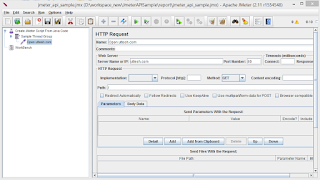
above code will generate the jmeter script which we wrote from the code.

5. Add Summary and reports

//add Summarizer output to get test progress in stdout like:
// summary =      2 in   1.3s =    1.5/s Avg:   631 Min:   290 Max:   973 Err:     0 (0.00%)
Summariser summer = null;
String summariserName = JMeterUtils.getPropDefault("summariser.name", "summary");
if (summariserName.length() > 0) {
    summer = new Summariser(summariserName);
}
// Store execution results into a .jtl file, we can save file as csv also
String reportFile = "report\\report.jtl";
String csvFile = "report\\report.csv";
ResultCollector logger = new ResultCollector(summer);
logger.setFilename(reportFile);
ResultCollector csvlogger = new ResultCollector(summer);
csvlogger.setFilename(csvFile);
testPlanTree.add(testPlanTree.getArray()[0], logger);
testPlanTree.add(testPlanTree.getArray()[0], csvlogger);

Finally Execute the test

// Run Test Plan
jmeter.configure(testPlanTree);
jmeter.run();

System.out.println("Test completed. See " + jmeterHome + slash + "report.jtl file for results");
System.out.println("JMeter .jmx script is available at " + jmeterHome + slash + "jmeter_api_sample.jmx");
System.exit(0);

Full Source Code of the POC is available on the GitHub click here
Simple source :

Generate JMX sample file by code and opened in jmeter UI.
Summary Report generated by code after test execution

Wednesday, April 8, 2015

get byte or memory size of array,list,collections in java

In java lot of time we will come across the scenerio where in which we need to find the how much memory used by given list.

The ArrayList holds a pointer to a single Object array, which grows as the number of elements exceed the size of the array. The ArrayList's underlying Object array grows by about 50% whenever we run out of space.

ArrayList also writes out the size of the underlying array, used to recreate an identical ArrayList to what was serialized.

sample code to get the memory size the collection in bytes


Monday, March 30, 2015

Generate the bar code image by itext

We can generate a bar code image by using the itext jar.

Itext jar : http://sourceforge.net/projects/itext/

Download jar : http://sourceforge.net/projects/itext/files/latest/download


sample code

import com.itextpdf.text.pdf.BarcodePDF417;
import java.awt.Color;
import java.awt.image.BufferedImage;
import java.io.ByteArrayOutputStream;
import java.io.FileOutputStream;
import java.io.IOException;
import javax.imageio.ImageIO;

/**
 *
 * @author Uttesh Kumar T.H.
 */
public class GenerateBarCodeImage {
    public static void main(String[] args) throws IOException {
        BarcodePDF417 barcode = new BarcodePDF417();
        barcode.setText("Bla bla");
        java.awt.Image img = barcode.createAwtImage(Color.BLACK, Color.WHITE);
        BufferedImage outImage = new BufferedImage(img.getWidth(null), img.getHeight(null), BufferedImage.TYPE_INT_RGB);
        outImage.getGraphics().drawImage(img, 0, 0, null);
        ByteArrayOutputStream bytesOut = new ByteArrayOutputStream();
        ImageIO.write(outImage, "png", bytesOut);
        bytesOut.flush();
        byte[] pngImageData = bytesOut.toByteArray();
        FileOutputStream fos = new FileOutputStream("barcode.png");
        fos.write(pngImageData);
        fos.flush();
        fos.close();
    }
}

Regular expression to extract the src tag details from given image tag or html source text


By using the regular expression we can extract the any data from the given input, here we are trying to get the src attribute value from the given image tag or html text data.

Image 'src' attribute extract Regx:

<img[^>]*src=[\\\"']([^\\\"^']*)


sample code:

import java.util.regex.Matcher;
import java.util.regex.Pattern;

/**
 *
 * @author Uttesh Kumar T.H.
 */
public class ImgTest {

    public static void main(String[] args) {

        String s = "<p><img src=\"38220.png\" alt=\"test\" title=\"test\" /> <img src=\"32222.png\" alt=\"test\" title=\"test\" /></p>";
        Pattern p = Pattern.compile("<img[^>]*src=[\\\"']([^\\\"^']*)");
        Matcher m = p.matcher(s);
        while (m.find()) {
            String src = m.group();
            int startIndex = src.indexOf("src=") + 5;
            String srcTag = src.substring(startIndex, src.length());
            System.out.println(srcTag);
        }
    }

}


Compare images are same by java

We can compare the given images are same or not by comparing the buffer data of the image.

1. Compare the image sizes are same or not.
2. Compare the binary data of two images are same or not.

sample code :

import java.awt.image.BufferedImage;
import java.awt.image.DataBuffer;
import java.io.File;
import javax.imageio.ImageIO;

/**
 *
 * @author Uttesh Kumar T.H.
 */
public class compareimage {

    public static boolean compareImage(File fileA, File fileB) {
        try {
            // take buffer data from botm image files //
            BufferedImage biA = ImageIO.read(fileA);
            DataBuffer dbA = biA.getData().getDataBuffer();
            int sizeA = dbA.getSize();
            BufferedImage biB = ImageIO.read(fileB);
            DataBuffer dbB = biB.getData().getDataBuffer();
            int sizeB = dbB.getSize();
            // compare data-buffer objects //
            if (sizeA == sizeB) {
                for (int i = 0; i < sizeA; i++) {
                    if (dbA.getElem(i) != dbB.getElem(i)) {
                        return false;
                    }
                }
                return true;
            } else {
                return false;
            }
        } catch (Exception e) {
            System.out.println("Failed to compare image files ...");
            return false;
        }
    }

    public static void main(String[] args) {
        File file1 = new File("path to image1");
        File file2 = new File("path to image2");
        System.out.println("result :" + compareImage(file1, file2));
    }
}

Saturday, March 28, 2015

Reverse elements in Array

Reverse all elements in array, traditional way how we use to do is get the array and iterate through the for loop and use swap logic to move to temporary array and get the result.

But from > jdk 1.5 introduced reverse() in java.util.Collections which will reverse the order of the elements, all we have to do is to convert the array to arraylist by using Arrays.asList() and using collections.reverse() to reverse the order of the element.

import java.util.Arrays;
import java.util.Collections;
import java.util.List;

/**
 *
 * @author Uttesh Kumar T.H.
 */
public class ReverseArray {

    public static void main(String[] args) {
        Integer[] numbers = new Integer[]{1, 2, 3, 4, 5, 6};
        List numberlist = Arrays.asList(numbers);
        Collections.reverse(numberlist);
        for (int i = 0; i < numberlist.size(); i++) {
            System.out.println(numberlist.get(i));
        }

        // logical way of doing , its always good to understand the logic 
        int[] _numbers = {1, 2, 3, 4, 5, 6};
        for (int i = 0; i < _numbers.length / 2; i++) {
            int temp = _numbers[i]; // swap numbers 
            _numbers[i] = _numbers[_numbers.length - 1 - i];
            _numbers[_numbers.length - 1 - i] = temp;
        }
        System.out.println("reversed array : " + Arrays.toString(_numbers));
    }
}


find character uppercase/lowercase count from given text

Find the character upper/lower case occurrence count with simple single line code without iteration in java.

int counta = text.split("(?=[a])").length - 1;

This simple code will find all the lowercase character 'a' from the given text, change the regx for the uppercase . ex 'A'.

sample test code

/**
 *
 * @author Uttesh Kumar T.H.
 */
public class Countchar {

    public static void main(String[] args) {
        String text = "asfasfzxph adsa wetw";
        int counta = text.split("(?=[a])").length - 1;
        System.out.println("count a : "+counta);
        

    }
}


Tuesday, March 3, 2015

Generate PDF report for selenium/testng test cases.

Use Open source pdfngreport plugin to generate the pdf report for the selenium/testng test cases execution.

It's Opensource and in maven repository

<dependency>
        <groupId>com.uttesh</groupId>
        <artifactId>pdfngreport</artifactId>
        <version>2.0.3</version>
</dependency>

Official WebPage http://uttesh.github.io/pdfngreport/

Pdf report will have chart shows how many test cases passed/failed/skipped.


Status table which shows full detail status of each test cases.


Exception summary of failed test cases.

Monday, March 2, 2015

Generate PDF page as image

We can generate the image of pdf page by using the Pdf-renderer

Simple class which generate the images file of given pdf file.

/*
 * To change this license header, choose License Headers in Project Properties.
 * To change this template file, choose Tools | Templates
 * and open the template in the editor.
 */
package mayan.pdf;

/**
 *
 * @author Uttesh Kumar T.H.
 */
import com.sun.pdfview.PDFFile;
import com.sun.pdfview.PDFPage;
import java.awt.Graphics;
import java.awt.GraphicsConfiguration;
import java.awt.GraphicsDevice;
import java.awt.GraphicsEnvironment;
import java.awt.HeadlessException;
import java.awt.Image;
import java.awt.Rectangle;
import java.awt.Transparency;
import java.awt.image.*;
import java.io.*;
import java.nio.ByteBuffer;
import java.nio.channels.FileChannel;
import javax.imageio.*;
import javax.swing.*;

public class PdfPageImageGenerator {

    public static void ImageGenerator() throws IOException {
        // load a pdf from a byte buffer
        File file = new File("sample.pdf");
        RandomAccessFile raf = new RandomAccessFile(file, "r");
        FileChannel channel = raf.getChannel();
        ByteBuffer buf = channel.map(FileChannel.MapMode.READ_ONLY, 0, channel.size());
        PDFFile pdffile = new PDFFile(buf);
        int numPgs = pdffile.getNumPages();
        for (int i = 0; i < numPgs; i++) {
            PDFPage page = pdffile.getPage(i);
            Rectangle rect = new Rectangle(0, 0, (int) page.getBBox().getWidth(), (int) page.getBBox().getHeight());
            Image img = page.getImage(rect.width, rect.height, rect, null, true, true);
            BufferedImage bImg = toBufferedImage(img);
            File yourImageFile = new File("pics\\page_" + i + ".png");
            ImageIO.write(bImg, "png", yourImageFile);
        }
    }

    public static BufferedImage toBufferedImage(Image image) {
        if (image instanceof BufferedImage) {
            return (BufferedImage) image;
        }
        image = new ImageIcon(image).getImage();
        boolean hasAlpha = hasAlpha(image);
        BufferedImage bimage = null;
        GraphicsEnvironment ge = GraphicsEnvironment.getLocalGraphicsEnvironment();
        try {
            int transparency = Transparency.OPAQUE;
            if (hasAlpha) {
                transparency = Transparency.BITMASK;
            }
            GraphicsDevice gs = ge.getDefaultScreenDevice();
            GraphicsConfiguration gc = gs.getDefaultConfiguration();
            bimage = gc.createCompatibleImage(image.getWidth(null), image.getHeight(null), transparency);
        } catch (HeadlessException e) {
        }
        if (bimage == null) {
            int type = BufferedImage.TYPE_INT_RGB;
            if (hasAlpha) {
                type = BufferedImage.TYPE_INT_ARGB;
            }
            bimage = new BufferedImage(image.getWidth(null), image.getHeight(null), type);
        }
        Graphics g = bimage.createGraphics();
        // Paint the image onto the buffered image
        g.drawImage(image, 0, 0, null);
        g.dispose();
        return bimage;
    }

    public static boolean hasAlpha(Image image) {
        if (image instanceof BufferedImage) {
            BufferedImage bimage = (BufferedImage) image;
            return bimage.getColorModel().hasAlpha();
        }
        PixelGrabber pg = new PixelGrabber(image, 0, 0, 1, 1, false);
        try {
            pg.grabPixels();
        } catch (InterruptedException e) {
        }
        ColorModel cm = pg.getColorModel();
        return cm.hasAlpha();
    }

    public static void main(final String[] args) {
        new Runnable() {
            public void run() {
                try {
                    PdfPageImageGenerator.ImageGenerator();
                } catch (IOException ex) {
                    ex.printStackTrace();
                }
            }
        }.run();
    }
}


formatted view of above code


Spring + JPA + Hibernate Sample


Introduction


Stand-alone Spring application sample, Spring framework supports the persistence layer to be fully implemented through JPA. Simple example of configure the Spring needed components to perform persistence over standard JPA i.e. Persistence Unit, the Entity Manager factory and the Transaction Manager.

Sample Implementation project folder structure :


implementation as DAO layer, Service layer and hibernate model.

Build POM.xml details.

<project xmlns="http://maven.apache.org/POM/4.0.0" xmlns:xsi="http://www.w3.org/2001/XMLSchema-instance"
         xsi:schemaLocation="http://maven.apache.org/POM/4.0.0 http://maven.apache.org/xsd/maven-4.0.0.xsd">
    <modelVersion>4.0.0</modelVersion>

    <groupId>com.uttesh.spring.entitymanager</groupId>
    <artifactId>SpringEntityManager</artifactId>
    <version>1.0-SNAPSHOT</version>
    <packaging>jar</packaging>

    <name>SpringEntityManager</name>
    <url>http://maven.apache.org</url>

    <properties>
        <project.build.sourceEncoding>UTF-8</project.build.sourceEncoding>
        <spring.version>3.2.5.RELEASE</spring.version>
        <hibernate.version>4.1.9.Final</hibernate.version>
    </properties>

    <dependencies>

        <dependency>
            <groupId>org.springframework</groupId>
            <artifactId>spring-core</artifactId>
            <version>${spring.version}</version>
        </dependency>

        <dependency>
            <groupId>org.springframework</groupId>
            <artifactId>spring-context</artifactId>
            <version>${spring.version}</version>
        </dependency>

        <dependency>
            <groupId>org.springframework</groupId>
            <artifactId>spring-tx</artifactId>
            <version>${spring.version}</version>
        </dependency>

        <dependency>
            <groupId>org.springframework</groupId>
            <artifactId>spring-orm</artifactId>
            <version>${spring.version}</version>
        </dependency>

        <dependency>
            <groupId>org.hibernate</groupId>
            <artifactId>hibernate-core</artifactId>
            <version>${hibernate.version}</version>
        </dependency>

        <dependency>
            <groupId>org.hibernate</groupId>
            <artifactId>hibernate-entitymanager</artifactId>
            <version>${hibernate.version}</version>
        </dependency>

        <dependency>
            <groupId>commons-dbcp</groupId>
            <artifactId>commons-dbcp</artifactId>
            <version>1.2.2</version>
        </dependency>
  
        <dependency>
            <groupId>mysql</groupId>
            <artifactId>mysql-connector-java</artifactId>
            <version>5.1.6</version>
        </dependency>

    </dependencies>
</project>


JPA Entity model class


package com.uttesh.spring.entitymanager.model;

import java.util.Date;
import javax.persistence.Column;
import javax.persistence.Entity;
import javax.persistence.GeneratedValue;
import javax.persistence.GenerationType;
import javax.persistence.Id;
import javax.persistence.Table;

@Entity
@Table(name = "USER")
public class User {

    @Id
    @Column(name = "ID", nullable = false)
    private int id;

    @Column(name = "NAME", nullable = false)
    private String name;

    @Column(name = "PASSWORD", nullable = false)
    private String password;

    @Column(name = "EMAIL", nullable = false)
    private String email;

    @Column(name = "SEX", nullable = false)
    private String sex;

    @Column(name = "DOB", nullable = false)
    private Date dob;

    @Column(name = "MOBILE", nullable = false)
    private String mobile;

    public int getId() {
        return id;
    }

    public void setId(int id) {
        this.id = id;
    }

    public String getName() {
        return name;
    }

    public void setName(String name) {
        this.name = name;
    }

    public String getPassword() {
        return password;
    }

    public void setPassword(String password) {
        this.password = password;
    }

    public String getEmail() {
        return email;
    }

    public void setEmail(String email) {
        this.email = email;
    }

    public String getSex() {
        return sex;
    }

    public void setSex(String sex) {
        this.sex = sex;
    }

    public Date getDob() {
        return dob;
    }

    public void setDob(Date dob) {
        this.dob = dob;
    }

    public String getMobile() {
        return mobile;
    }

    public void setMobile(String mobile) {
        this.mobile = mobile;
    }

    
}


Spring service and DAO layers

DAO layer
package com.uttesh.spring.entitymanager.dao;

import java.util.List;

import com.uttesh.spring.entitymanager.model.User;

public interface IUserDAO {

 public void save(User user);
 List<User> findAllUsers();
}

The Entity Manager is injected through the regular JPA @PersistenceContext annotation.

package com.uttesh.spring.entitymanager.dao.impl;

import com.uttesh.spring.entitymanager.dao.IUserDAO;
import com.uttesh.spring.entitymanager.model.User;
import java.util.List;
import javax.persistence.EntityManager;
import javax.persistence.PersistenceContext;
import javax.persistence.criteria.CriteriaBuilder;
import javax.persistence.criteria.CriteriaQuery;
import javax.persistence.criteria.Root;
import org.springframework.stereotype.Repository;

@Repository
//@Transactional(propagation = Propagation.MANDATORY, rollbackFor = {Exception.class})
public class UserDAOImpl implements IUserDAO {

    @PersistenceContext
    private EntityManager entityManager;

    @Override
    public void save(User user) {
        entityManager.persist(user);
        System.out.println("saved record : " + user.getId());
    }

    
    @Override
    public List<User> findAllUsers() {
        CriteriaBuilder builder = entityManager.getCriteriaBuilder();
        CriteriaQuery<User> cq = builder.createQuery(User.class);
        Root<User> root = cq.from(User.class);
        cq.select(root);
        return entityManager.createQuery(cq).getResultList();
    }

}

service layer


package com.uttesh.spring.entitymanager.user;

import java.util.List;

import com.uttesh.spring.entitymanager.model.User;

public interface IUserService {

 void save(User user);
 List<User> findAllUsers();
}

package com.uttesh.spring.entitymanager.user.impl;

import com.uttesh.spring.entitymanager.dao.IUserDAO;
import com.uttesh.spring.entitymanager.model.User;
import com.uttesh.spring.entitymanager.user.IUserService;
import java.util.List;
import java.lang.UnknownError;
import java.util.logging.Level;
import java.util.logging.Logger;
import org.springframework.beans.factory.annotation.Autowired;
import org.springframework.stereotype.Service;
import org.springframework.transaction.annotation.Propagation;
import org.springframework.transaction.annotation.Transactional;

@Service
//@Transactional(rollbackFor = Exception.class, propagation = Propagation.REQUIRED)
public class UserServiceImpl implements IUserService {

    @Autowired
    private IUserDAO userDAO;

    //@Transactional(readOnly = false)
    public void save(User user) {
        try {
            userDAO.save(user);
            save1();
           // save2();
        } catch (InterruptedException ex) {
            Logger.getLogger(UserServiceImpl.class.getName()).log(Level.SEVERE, null, ex);
        }
    }

    public void save1() throws InterruptedException {
        User user = new User();
        user.setId(1008);
        user.setName("Uttesh kumar");
        user.setEmail("uttesh@gmail.com");
        user.setMobile("0123456789");
        user.setPassword("password");
        userDAO.save(user);
    }

    public void save2() {
        throw new UnknownError("INVALID");
    }

    @Transactional(readOnly = false)
    public List<User> findAllUsers() {
        return userDAO.findAllUsers();
    }

}

persistence.xml

<?xml version="1.0" encoding="UTF-8"?>
<persistence version="2.0" xmlns="http://java.sun.com/xml/ns/persistence" xmlns:xsi="http://www.w3.org/2001/XMLSchema-instance" xsi:schemaLocation="http://java.sun.com/xml/ns/persistence   http://java.sun.com/xml/ns/persistence/persistence_2_0.xsd">
  <persistence-unit name="springEntitypersistenceUnit" transaction-type="RESOURCE_LOCAL">
    <provider>org.hibernate.ejb.HibernatePersistence</provider>
    <class>com.uttesh.spring.entitymanager.model.User</class>
    <properties>
      <property name="hibernate.dialect" value="org.hibernate.dialect.MySQL5Dialect"/>
    </properties>
  </persistence-unit>
</persistence>

spring.xml

<?xml version="1.0" encoding="UTF-8"?>
<beans xmlns="http://www.springframework.org/schema/beans"
	xmlns:xsi="http://www.w3.org/2001/XMLSchema-instance" xmlns:context="http://www.springframework.org/schema/context"
	xmlns:tx="http://www.springframework.org/schema/tx" xmlns:p="http://www.springframework.org/schema/p"
	xsi:schemaLocation="http://www.springframework.org/schema/beans
    http://www.springframework.org/schema/beans/spring-beans-3.0.xsd
    http://www.springframework.org/schema/context
    http://www.springframework.org/schema/context/spring-context-3.0.xsd 
    http://www.springframework.org/schema/tx 
    http://www.springframework.org/schema/tx/spring-tx.xsd">

	<tx:annotation-driven />

	<context:component-scan base-package="com.uttesh.spring.entitymanager.dao.impl" />
	<context:component-scan base-package="com.uttesh.spring.entitymanager.user.impl" />

	<bean id="dataSource" class="org.apache.commons.dbcp.BasicDataSource"
		destroy-method="close">
		<property name="driverClassName" value="com.mysql.jdbc.Driver" />
		<property name="url" value="jdbc:mysql://localhost:3306/lab" />
		<property name="username" value="user" />
		<property name="password" value="password" />
	</bean>

	<bean id="entityManagerFactory"
		class="org.springframework.orm.jpa.LocalContainerEntityManagerFactoryBean">
		<property name="persistenceUnitName" value="springEntitypersistenceUnit" />
		<property name="dataSource" ref="dataSource" />
	</bean>

	<bean id="transactionManager" class="org.springframework.orm.jpa.JpaTransactionManager">
		<property name="entityManagerFactory" ref="entityManagerFactory" />
	</bean>

</beans>


Testing

execute the sample.java class.

package com.uttesh.spring.entitymanager;

import java.util.List;

import org.springframework.context.ApplicationContext;
import org.springframework.context.support.ClassPathXmlApplicationContext;

import com.uttesh.spring.entitymanager.model.User;
import com.uttesh.spring.entitymanager.user.IUserService;

public class Sample {

    public static void main(String[] args) {

        ApplicationContext ctx = new ClassPathXmlApplicationContext("spring.xml");
        IUserService userManager = (IUserService) ctx.getBean("userServiceImpl");
        List<User> list = userManager.findAllUsers();
        User user = new User();
        user.setId(1006);
        user.setName("Uttesh kumar");
        user.setEmail("uttesh@gmail.com");
        user.setMobile("0123456789");
        user.setPassword("password");
        userManager.save(user);
        System.out.println("User Saved");
        list = userManager.findAllUsers();
        System.out.println("User count: " + list.size());

    }
}

Download source code from github Click here.